What Entra apps do
Entra apps do three main jobs: sign people in, hand out tokens and limit what each app may do.
Sign-in
When you open an app, it sends you to Microsoft to sign in, so the app never sees your password. Entra checks who you are, applies the organisation's rules (for example multi-factor authentication through Conditional Access) and then sends you back to the app. Standard protocols are used for this, including OpenID Connect and OAuth 2.0, and SAML for many older apps.
Tokens
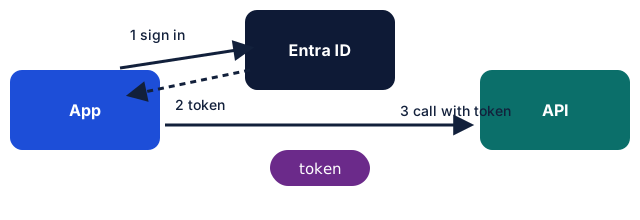
After a successful sign-in the app receives tokens, small signed pieces of data that prove something:
- An ID token says who signed in.
- An access token lets the app call a service, such as Microsoft Graph, for a limited time.
- A refresh token lets the app get a new access token without asking the user to sign in again.
Tokens are short-lived on purpose, so a stolen token is useful for only a little while.
Permissions
Each app asks for specific permissions, called scopes or app roles. There are two main kinds:
- Delegated permissions let the app act on behalf of the signed-in user, limited to what that user can do.
- Application permissions let the app act as itself with no user present. These are powerful and need administrator approval.
The act of agreeing to the permissions is called consent. A user may be able to consent to some low-risk permissions; an administrator can approve others for the whole organisation.