The app lifecycle
Every Entra app goes through the same stages, whether it lasts a week or ten years.
The seven stages
Select a stage to read what happens in it.
Register
Create the app registration in Entra. This gives the app its application (client) ID and says which accounts may sign in.
Configure
Set redirect addresses, choose the permissions the app requests and decide how it proves its identity.
Consent
A user or an administrator reviews the permissions and agrees. Administrators handle the high-impact ones.
Rotate credentials
Secrets and certificates expire. Replace them before they do, ideally on a schedule, and remove old ones.
Monitor
Watch sign-in and audit logs for unusual activity, such as sign-ins from unexpected places.
Review
Periodically check the owner, the permissions and whether the app is still needed.
Retire
When the app is no longer used, remove its permissions and credentials, then delete it.
It is a loop, not a line
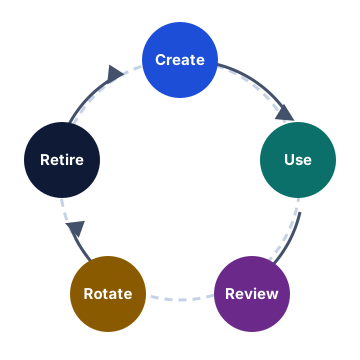
The picture is a simplified view of the seven stages above. Monitoring and review feed back into configuration. A review might reduce permissions, which means asking for consent again; a credential rotation brings you back to configuring the app. Retiring unused apps is the step most often skipped, and it matters as much as the first.